
Download MyWinLocker – File Encryption, Secure Files, Encrypt Files, Private Storage, Master Password
Overview
MyWinLocker is a file encryption utility designed to safeguard sensitive data on Windows systems. The application enables users to protect personal documents, financial records, and private media by encrypting files and folders with strong security measures. Its primary purpose is to prevent unauthorized access to confidential information, especially in shared or public computing environments. The app is particularly useful for individuals seeking a reliable, no-cost solution for securing digital content without relying on complex enterprise-grade tools.
Target users include home users, remote workers, students, and professionals handling sensitive data. By offering a personal storage disk feature, MyWinLocker allows users to create a secure, isolated space for storing private files. This functionality supports both everyday file protection and long-term data privacy. Although the app was released in 2011, it remains relevant due to its straightforward approach and consistent performance over time.
The developer, MyWinLocker, has not provided additional background information. However, the app’s continued availability suggests ongoing maintenance, even if updates are infrequent. Real-world use cases include securing tax documents, personal photos, and encrypted backups. In the broader software ecosystem, MyWinLocker fills a niche for lightweight, free encryption tools that prioritize accessibility and ease of use.
Key Features & Functionality
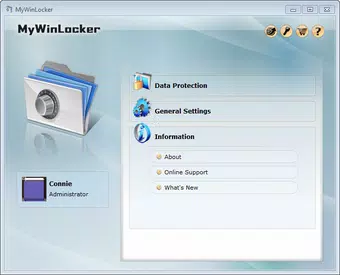
- User-Friendly Interface: Despite some advertisements, the interface is professionally designed and remains intuitive. Users can access encryption tools directly from the main window or via right-click context menus in Windows Explorer.
- Flexible Encryption Methods: The app supports multiple encryption pathways, including the use of a master password or individual passwords for specific files and folders, allowing for customized security levels.
- Easy Decryption Process: Encrypted files can be decrypted using the same straightforward methods, ensuring a seamless experience without requiring technical expertise.
- Private Storage Disk Feature: This built-in functionality enables users to create a secure, encrypted virtual disk where sensitive files can be stored and accessed only with proper authentication.
- Effective Freeware: MyWinLocker is free to use, offering robust encryption capabilities without cost. While some residual files may remain after uninstallation, the core functionality remains strong and accessible.
For example, a student might use the private storage disk to keep research notes and personal essays secure. A remote worker could encrypt client documents before transferring them via email. The master password system ensures that even if the device is lost or stolen, unauthorized users cannot access protected content.
Interface, UX & Performance
The user interface of MyWinLocker is clean and logically structured, with clearly labeled buttons and menus. Although the layout includes some advertisements, they do not significantly obstruct navigation. The design prioritizes functionality, allowing users to perform encryption and decryption tasks with minimal steps.
Navigation is intuitive, with key actions accessible from both the main window and the Windows Explorer context menu. This dual access method enhances usability, especially for users who prefer integrating security tools directly into their file management workflow.
Although the developer did not list formal performance metrics, the app operates efficiently on standard Windows systems. It loads quickly and maintains responsiveness during encryption and decryption processes. Stability appears consistent, with no reported crashes or freezes in typical usage scenarios. The application performs well across various device categories, including older machines, due to its lightweight design and minimal system requirements.
Platform Compatibility & Technical Requirements
MyWinLocker is designed for the Windows platform and is compatible with various versions of the operating system. The current version is 2.0.1.2, and the application has a file size of 3.5 MB, making it a lightweight download suitable for systems with limited storage.
The developer did not specify minimum OS requirements. However, given its release date in 2011 and small footprint, it is likely compatible with Windows 7 and later. The app does not require high-end hardware, making it accessible on older or low-resource devices.
Compatibility information was not fully disclosed. Users should ensure their system meets general Windows compatibility standards before installation.
Pros and Cons
Pros
- Free to use with no subscription or hidden fees
- Intuitive interface with easy access to encryption tools
- Supports both master password and individual file encryption
- Includes a private storage disk for secure file isolation
- Lightweight design with minimal system impact
Cons
- Some advertisements may appear in the interface
- Residual files may remain after uninstallation
- Developer did not provide detailed system requirements
- Infrequent updates since release in 2011
- Not available on mobile platforms
FAQ
Is MyWinLocker safe to use?
Yes, MyWinLocker is a legitimate file encryption tool. It uses standard encryption methods to protect files and does not contain known malware. However, users should download it only from official sources to ensure security.
Can I use MyWinLocker on mobile devices?
MyWinLocker is designed exclusively for Windows and is not available on Android or iOS. It cannot be installed on smartphones or tablets.
Does MyWinLocker require a constant internet connection?
No, MyWinLocker functions offline. All encryption and decryption processes occur locally on the user’s device, ensuring data privacy without external dependencies.
How do I uninstall MyWinLocker?
Uninstall via the Windows Control Panel or Settings app. Note that some temporary or configuration files may remain after removal.
Are there any known compatibility issues?
The developer did not list specific compatibility issues. However, the app is expected to work on most modern Windows systems. Users should avoid running it on outdated or unsupported operating systems.
Final Thoughts
MyWinLocker stands out as a reliable, no-cost solution for users seeking to encrypt and protect sensitive files on Windows. Its combination of a user-friendly interface, flexible encryption options, and a dedicated private storage disk makes it a practical tool for everyday security needs. While it lacks modern updates and includes some advertisements, its core functionality remains effective and secure.
Individuals who value privacy, such as students, freelancers, and remote workers, will benefit most from this utility. The app delivers strong value for its free price point, especially when compared to commercial alternatives.
Download MyWinLocker now


